Wedding RSVP: how to collect responses without the hassle
You have a date, a venue, and a guest list. Now you need to find out who is actually coming. That sounds simple, but anyone who has ever organized a wedding knows: it is not.
Some guests respond within five minutes. Others go weeks without a word. And then there are the people who say they will "call to discuss it" and then never call. Meanwhile, the caterer needs a final count, the venue wants to know how many chairs are needed, and you are trying to build a seating plan with a guest list that changes every day.
Collecting RSVPs does not have to be a frustrating chore. In this article, we explain what RSVP actually means, how to handle it smartly on your invitation, and which tools help you keep track.
What does RSVP mean?
RSVP stands for "Répondez s'il vous plaît," French for "Please respond." It is a request for the recipient to indicate whether they will attend. The abbreviation is used worldwide on invitations, from formal dinners to birthdays and weddings.
On a wedding invitation, you typically see RSVP near the bottom, sometimes followed by a date and a way to respond (email, phone number, or increasingly a website or link). It simply means: let us know if you are coming. Nothing more, nothing less.
Yet for many guests, it is apparently not that clear. Research shows that about 20% of invitees do not respond to an RSVP unless you personally remind them. That is why it is smart to not only ask for a response, but also make it very clear how and when you expect it.
RSVP on your invitation: how to word it
The way you phrase the RSVP on your invitation matters. Too formal and people feel distant. Too vague and they do not know what to do. Here are three example texts you can use or adapt.
Classic and short:
"We kindly ask you to let us know by [date] whether you will be joining us. Please RSVP via [email/link]."
Casual and personal:
"Will you be there? Let us know before [date]! You can use the link on this card or send us a message at [number]."
With context:
"To help us plan everything properly, we would love to know by [date] whether you can make it. Use the link below to confirm your attendance and share any dietary requirements."
The most important thing: always include a deadline. Without a deadline, guests feel no urgency and keep putting it off. Add the RSVP deadline to your wedding checklist so you do not forget it.
Tracking RSVPs: spreadsheet vs. app
The classic approach: an Excel file with names, email addresses, and a column for "attending / not attending." That works fine when you have thirty guests. At eighty or more, it is a different story.
You get responses via WhatsApp, email, phone, and sometimes through your mother-in-law who "just passed on the message." All those separate messages need to be manually entered into your spreadsheet. Miss one and your count is off. And then there are the guests who first said "yes" and later called to say "actually, no."
With an online RSVP tool, that problem disappears. Guests fill in their details themselves, and the overview is updated automatically. No double work, no forgotten messages, no spreadsheet your partner accidentally overwrote.
The benefit of a digital approach goes beyond convenience. You always have an up-to-date overview: how many guests have responded, how many are coming, how many have dietary needs, and who has not responded yet. That last group you can then send a targeted reminder.
Personal RSVP links
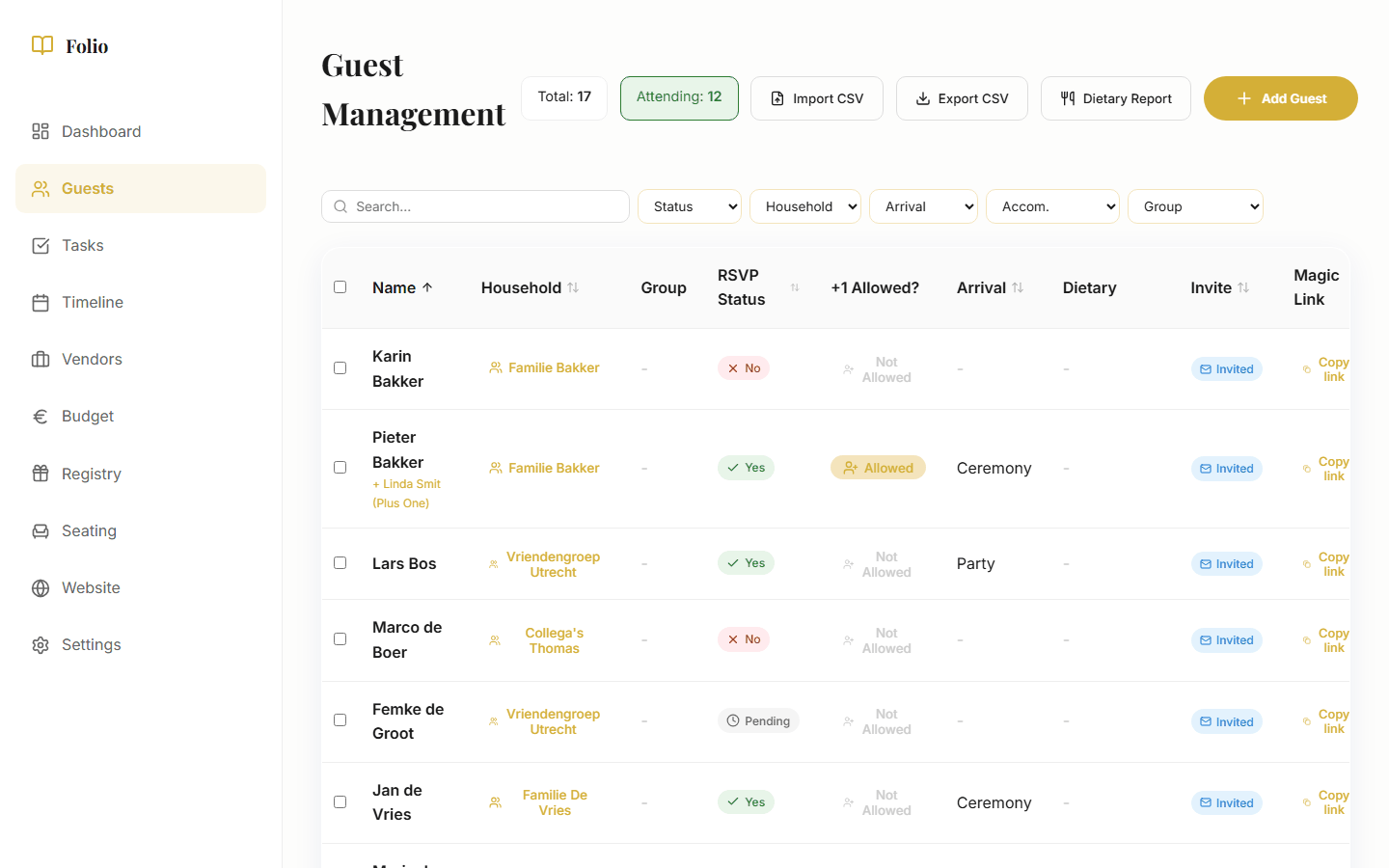
With Folio, the RSVP system works with personal links. Each guest (or household) gets a unique link. No logging in, no account creation, no app to download. The guest clicks the link, fills in whether they are coming, and done.
Behind that link is a form that asks exactly the right questions. Is this guest attending? With how many people? Dietary requirements? This is processed directly into your guest overview. No manual retyping, no piecing together separate messages.
Because each link is unique, you know exactly who has responded and who has not. That makes follow-up easy: filter by "no response" and send that group a reminder. Want to know more about how Folio works? Check out the wedding app.
The beauty is that guests do not need to install anything. They receive a link (via the invitation, email, or WhatsApp), click on it, and fill in the form. That lowers the barrier enormously. The easier you make it, the faster people respond.
What to ask in an RSVP
Keep it short. Guests drop off with long forms. These are the fields that matter:
- Attendance: Is this guest coming or not? The basics.
- Number of people: Is the guest coming alone or with a partner? Do they have a plus-one?
- Day part: Is the guest invited for the full day, dinner only, or evening only? Not everyone needs to see the same questions.
- Dietary needs: Vegetarian, vegan, allergies? You need to pass this on to the caterer anyway, so ask it here.
- Accommodation: Do guests need a hotel room? Useful if you have reserved a block of rooms.
- Comments: A free text field for anything that does not fit the fields above.
Do not ask more than necessary. Questions about gift preferences, clothing size for a dress code, or "how do you know the couple" are well-meaning but make the form unnecessarily long.
Common mistakes
Collecting RSVPs is not complicated, but there are a few pitfalls many couples fall into.
Asking too late. If you send invitations two weeks before the wedding, you have no time to chase non-respondents. Send them at least six to eight weeks in advance.
No deadline. "Just let us know if you are coming" is too vague. Put a date on it. People need a nudge.
Unclear how to respond. If you offer three options (call, email, WhatsApp), you get responses across three channels that you all need to track. Pick one. Preferably a digital option where the response is automatically processed.
Not following up. There are always guests who do not respond. Schedule a moment in your timeline to send a reminder two weeks before the deadline. And call the last stragglers a week before the deadline.
Not accounting for households. A family of two adults and two children does not want to fill in four separate forms. Group guests by household, so one person can respond for the whole family.
RSVP deadline: when?
The rule of thumb: send your invitations six to eight weeks before the wedding and set the RSVP deadline at three to four weeks before the day. That gives guests enough time to respond, and you enough time to give the final count to the venue and caterer.
A practical timeline:
- 8 weeks before the wedding: Send invitations (or share RSVP links)
- 4 weeks before the wedding: RSVP deadline
- 3 weeks before the wedding: Send reminder to guests who have not responded
- 2 weeks before the wedding: Final round of calls, establish definitive guest count
- 1 week before the wedding: Give guest count to venue and caterer
Keep in mind that some venues and caterers need a final number earlier. Check with your vendors and adjust your deadline accordingly. Want to make sure you do not forget anything? Add all deadlines to your wedding checklist.
Manage RSVPs with Folio
With Folio, you send each guest a personal RSVP link. No accounts, no apps for guests to download. They fill in whether they are coming, how many, and dietary requirements. You see it instantly in the overview.