Wedding Guest List: how to track your guests without chaos
The guest list is the foundation of your wedding. Everything depends on it: the budget, the venue, the catering, the seating chart, the number of invitations, the number of chairs, plates, and favours. Without a solid guest list, you are planning in thin air.
Yet most couples start with a spreadsheet. That works fine at 20 names. At 50 it becomes messy. At 80 you no longer know who is coming for dinner and who is only there for the party. At 120 it is chaos: missing RSVPs, forgotten dietary needs, duplicate names, and the question of whether your aunt's new boyfriend counts as a plus-one.
In this article, you will learn how to set up a guest list that works, what to track per guest, and how to avoid still chasing people two weeks before the wedding.
First draft: who do you invite?
Start with a broad list. Write down everyone you are considering, without worrying about numbers just yet. The trimming comes later.
A useful starting point is dividing by day parts. In many European weddings, not everyone is invited for the full day. A common split:
- Ceremony and dinner (day guests): family, close friends, witnesses. This is the core.
- Evening party (evening guests): colleagues, acquaintances, extended family, neighbours. They join after dinner.
This split directly impacts your budget. Day guests cost you a full dinner, drinks, and a longer presence. Evening guests cost a snack and drinks. The difference can be €80 to €150 per person. Want to know more about how guests affect your budget? Read our overview of wedding costs.
A-list and B-list
Not popular to say out loud, but it is how it works: most couples maintain an A-list and a B-list. The A-list are the people you are definitely inviting. The B-list are the people you would love to have, but only if there is room (if someone from the A-list declines).
That sounds cold, but it is practical. Venues have a maximum capacity. Budgets have a ceiling. You cannot invite everyone, and pretending you can leads to problems.
Difficult decisions
The hardest conversations about the guest list are not about numbers, but about expectations. Parents who insist that Uncle John and Aunt Mary absolutely must be there. The colleague who assumes they will be invited. The ex you are still on good terms with but your partner would rather not see.
There is no perfect solution. But there is a practical one: agree as a couple on how many guests each "side" can invite, and stick to it. That prevents lopsided lists and endless discussions.
What to track per guest
A name and a tick for "coming" or "not coming" is not enough. This is what you want to record per guest:
- Name and which household the guest belongs to
- Day part: day guest or evening guest
- RSVP status: invited, confirmed, declined, or no response yet
- Dietary needs: vegetarian, vegan, gluten-free, allergies. Your caterer needs this, and preferably not three days before the wedding.
- Plus-one: can this guest bring someone? And if so, does that person also have dietary needs?
- Accommodation: does the guest need somewhere to stay? Useful to know if you are arranging hotel blocks.
- Contact details: email address or phone number for RSVP follow-up. Because there is always someone who does not respond.
That seems like a lot, but if you do not record it now, you will be figuring it out later. Better to do it right the first time.
Households vs individual guests
A common mistake: treating every guest as a separate individual. In practice, you invite households. A couple receives one invitation, not two. A family with two children receives one, not four.
Why that matters:
- Invitations: you send one per household, not per person. Saves paper, postage, and confusion.
- RSVP: a household responds as a unit. "We are coming with three" is clearer than three separate responses.
- Overview: you see at a glance how many households are coming and how many people that totals.
Take a family as an example: John and Sarah with children Emma (8) and Tom (5). That is one household of four people. You send one invitation. John confirms for the whole family. Emma has a nut allergy. Tom only eats pasta. You want to see all of that under one household, not spread across four separate rows.
Plus-ones work the same way. If you give a single friend a plus-one, that plus-one belongs to the same household. One invitation, one RSVP response, but the guest count goes up by two.
Tracking RSVPs
Tracking RSVPs is where most guest lists go off the rails. Not because it is complicated, but because responses come in through every possible channel.
One person messages "we are coming!" on WhatsApp. Another calls your mum to say they will be there. Yet another sends an email to your partner. And then there is always that one cousin who says "oh, I thought I already told you we are coming?" while nobody can confirm that.
The result: you have no idea who has confirmed, who still needs to respond, and whether that guest count of 87 you gave the venue is actually correct.
The solution is simple: a central system where everything lives. Folio works with personal RSVP links per household. Each guest gets their own link, fills in the form, and the response lands directly in your guest list. No hassle with separate messages, no manual retyping, no doubt about who is and is not coming.
From guest list to seating chart
Once the RSVPs are in, the next puzzle begins: the seating chart. Who sits where? Who can sit next to whom? Who absolutely cannot sit next to whom?
The guest list is the starting point. You know who is coming, how many people, which households belong together. From there, you distribute people across tables, accounting for relationships, ages, and the inevitable family dynamics.
You do not do that in a spreadsheet. You do it visually, by dragging and shuffling people until it works. In Folio, you can create a seating chart based on your confirmed guest list, so you do not have to start from scratch.
Track your guest list with Folio
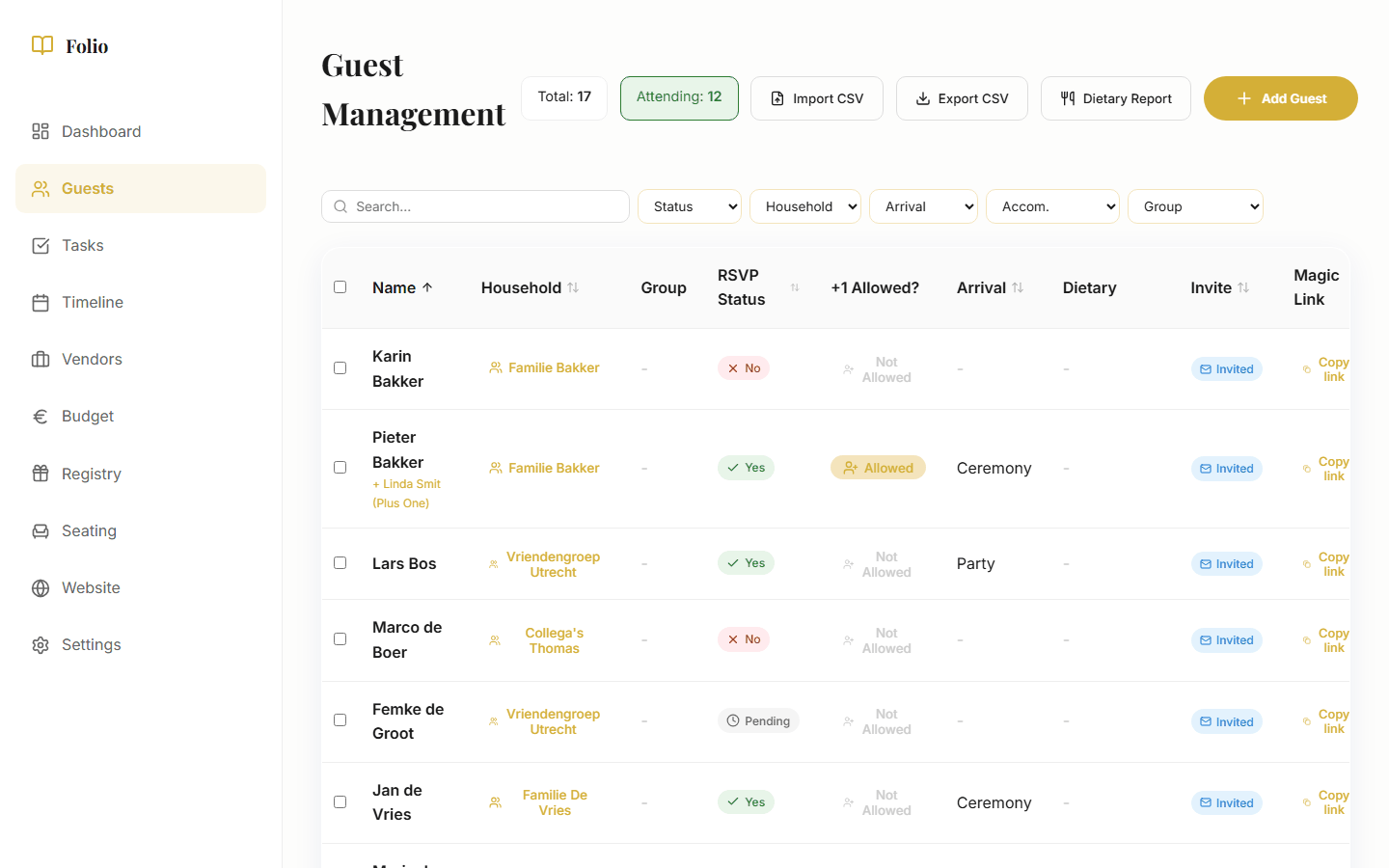
A guest list that works needs to do more than store names. You want to filter by status (who has not responded yet?), by day part (how many day guests, how many evening guests?), and by dietary needs (how many vegetarians, how many gluten-free?).
With Folio, you can do exactly that:
- Filter by RSVP status: instantly see who confirmed, who declined, and who you still need to chase.
- Filter by day part: view day guests and evening guests separately.
- Dietary report: an overview of all dietary needs that you can give directly to your caterer.
- Export: export the guest list for your venue, caterer, or printer.
- Personal RSVP links: guests fill in their own response, including dietary needs and plus-one.
The guest list is one of the many things you track with Folio. Check our wedding checklist for a complete overview of everything involved in planning a wedding.
Every wedding is different. Use this as a guide and adapt what works for you.